
Agentic Payment Link
This feature is only available in EMEA.
Your account must be enabled for this feature.
The Agentic Payment link let your agentic workflow or LLM-based application create gateway payment links and check their status directly through the Model Context Protocol (MCP), without your application needing to call the underlying REST APIs itself.
A typical flow looks like this:
- A consumer reaches a point in your merchant application or chat experience where a payment is needed.
- Your MCP client calls
IPG_LINK_PAYMENT_GET_LINKto obtain a hosted payment page URL. - You share that URL with the consumer, who completes the payment on Fiserv's hosted payment page.
- Your MCP client calls
IPG_LINK_PAYMENT_GET_STATUSto confirm the outcome and continue the conversation or workflow.
All requests are authenticated with a bearer token (OAuth 2.0 / OpenID Connect) scoped to your merchant store, and are routed through Fiserv's API gateway.
What you need before you start
- A gateway (IPG) generated Store ID, User ID, and password issued during onboarding. The KeyCloak username is the combination of
{StoreID} and {UserID}. - Optionally, a Time-based One-Time Password (TOTP) secret if your account has one-time-password login enabled.
- An MCP client (agentic runtime, LLM application, or any client library) that supports:
- the MCP streamable HTTP transport, and
- OAuth 2.0 Authorization Code flow with PKCE.
Environments
Test / CI
| Setting | Value |
|---|---|
| MCP Endpoint (Apigee ingress) | https://cat.emea.api.fiservapps.com/exp/v2/payment-links/mcp |
| Identity Provider (Keycloak issuer) | https://test.ipg-online.com/gws-sso/auth/realms/ipgMcp |
Production
| Setting | Value |
|---|---|
| MCP Endpoint (Apigee ingress) | https://prod.emea.api.fiservapps.com/exp/v2/payment-links/mcp |
| Identity Provider (Keycloak issuer) | https://www.ipg-online.com/gws-sso/auth/realms/ipgMcp |
Connecting your MCP client
1. Client configuration
Configure your MCP client with the MCP endpoint for your target environment (see Environments above) and the following values:
| Setting | Value |
|---|---|
| OAuth client ID | ipg-mcp-paymentlink-client |
| Scope | openid mcp payment-link profile email checkout-inquiry |
| Redirect / callback URI | http://127.0.0.1:<port>/callback — any free local port, for example 8090 |
| Grant type | Authorization Code with PKCE (code_challenge_method=S256) |
2. OAuth discovery
Most MCP clients discover the OAuth endpoints automatically. If yours needs them explicitly, resolve them in this order:
| Purpose | Endpoint | Defined by |
|---|---|---|
| Protected Resource Metadata | {mcpBaseUrl}/.well-known/oauth-protected-resource | RFC 9728 |
| Authorization Server Metadata (proxied) | {mcpBaseUrl}/.well-known/oauth-authorization-server | RFC 8414 compatibility passthrough |
| Authorization Server Metadata (standard) | {keycloakIssuer}/.well-known/openid-configuration | OpenID Connect Discovery |
{mcpBaseUrl} is the MCP endpoint for your target environment; {keycloakIssuer} is the matching Identity Provider issuer (see Environments).
3. Authenticate
-
Your MCP client opens a browser to the Keycloak
authorization_endpointwith yourclient_id, requestedscope, and a PKCEcode_challenge. -
Log in with your Store ID and User ID, plus your password (and TOTP code, if enabled).
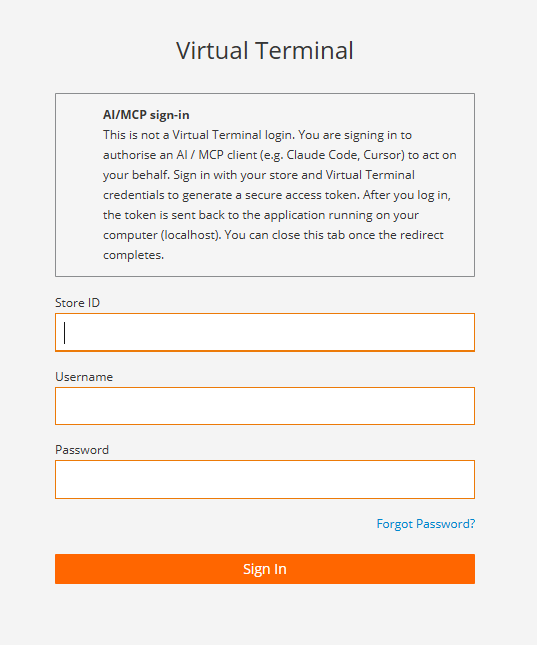
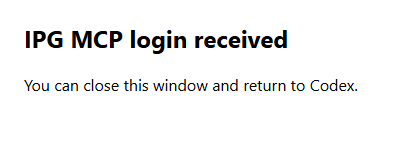
Once the login is successfully completed, the following window will be displayed.
-
Keycloak redirects back to your local callback URI with an authorization code.
-
Your MCP client exchanges the code for an access token at the
token_endpoint.
The resulting bearer token carries these claims:
| Claim | Meaning | Notes |
|---|---|---|
iss | Token issuer | The Keycloak realm URL for the environment you authenticated against |
aud | Intended audience | Differs by hop: the gateway validates one audience value, the Payment Link MCP Server another, and the Checkout API another |
sub | Subject | Encodes your authenticated store; used server-side to scope every request to your store |
scope | Granted scopes | Must include mcp and payment-link |
exp | Expiry | Standard JWT expiry. Re-authenticate once the token expires; don't keep retrying with an expired token |
4. Session handshake
Once authenticated, your MCP client performs the standard MCP handshake before making tool calls:
initialize            -> server capabilities
notifications/initialized
tools/list             -> IPG_LINK_PAYMENT_GET_LINK, IPG_LINK_PAYMENT_GET_STATUS
tools/call              -> your actual request
Send the bearer token on every request as Authorization: Bearer <token>.
If calls suddenly start failing with a generic
500 Internal Server Errorafter your client has been idle for a while, reconnect your MCP client to start a fresh session rather than retrying — see Error handling.
Tools reference
IPG_LINK_PAYMENT_GET_LINK
Creates a new hosted payment link for a given amount and currency.
Presence: m = mandatory, c = conditional, o = optional.
Request
| Tag | Description | Presence |
|---|---|---|
payment_link.amount | Amount to charge. Must be a finite, positive number — the server does not silently round it. | m |
payment_link.currency | ISO 4217 currency code (for example EUR, USD). Must be supported by your store configuration. | m |
{
  "payment_link": {
    "amount": 10.00,
    "currency": "EUR"
  }
}
Response
| Tag | Description | Presence |
|---|---|---|
storeId | Your merchant store ID, echoed back from the token. | m |
orderId | Gateway order ID created for this link. | m |
paymentLinkId | Short identifier for the link. Use it later with IPG_LINK_PAYMENT_GET_STATUS. | m |
paymentLinkURL | The hosted payment page URL to share with the consumer. | m |
expiryDateTime | ISO 8601 timestamp after which the link can no longer be paid. | m |
{
  "paymentLink": {
    "storeId": "120995513002",
    "orderId": "PL-100000775467",
    "paymentLinkId": "BpLgK3",
    "paymentLinkURL": "https://checkout-lane.com/pl/BpLgK3",
    "expiryDateTime": "2026-06-29T15:35:33+02:00"
  }
}
IPG_LINK_PAYMENT_GET_STATUS
Retrieves the current status of a previously created payment link.
Request
| Tag | Description | Presence |
|---|---|---|
payment_link_status.link_id | The paymentLinkId returned by IPG_LINK_PAYMENT_GET_LINK. | m |
{
  "payment_link_status": {
    "link_id": "BpLgK3"
  }
}
Response
Presence: m = mandatory (always present), c = conditional (present once the link has actually been used/paid).
| Tag | Description | Presence |
|---|---|---|
transactionStatus | Current status, for example APPROVED, DECLINED, INITIATED, WAITING. | m |
transactionType | Transaction type, for example SALE. | m |
transactionAmount.total / .currency | Amount and currency of the transaction. | m |
paymentMethodUsed.cards.cardNumber / .brand | Masked PAN (for example 411111******1111) and card brand. | c |
ipgTransactionDetails.transactionResult | Result of the underlying IPG transaction (for example APPROVED). | c |
ipgTransactionDetails.approvalCode | Issuer / processor approval code. | c |
ipgTransactionDetails.processor.responseCode / .responseMessage | Processor response code and human-readable message. | c |
ipgTransactionDetails.transactionState | Settlement state, for example CAPTURED. | c |
ipgTransactionDetails.ipgTransactionId | IPG's internal transaction ID — useful when contacting support. | c |
{
  "transactionStatus": "APPROVED",
  "transactionType": "SALE",
  "transactionAmount": { "total": 10.0, "currency": "EUR" },
  "paymentMethodUsed": {
    "cards": { "cardNumber": "411111******1111", "brand": "VISA" }
  },
  "ipgTransactionDetails": {
    "transactionResult": "APPROVED",
    "approvalCode": "Y:804167:4661560435:PPXM:5147258943",
    "processor": { "responseCode": "00", "responseMessage": "Function performed error-free" },
    "transactionState": "CAPTURED",
    "ipgTransactionId": "84661560435"
  }
}
Error handling
| Error / Status | Meaning | Recommended action |
|---|---|---|
401 — invalid_token | Your bearer token is invalid, expired, or no longer recognized. | Clear cached tokens in your MCP client and re-authenticate. |
checkout_connection (in the tool result) | The Payment Link MCP Server could not reach the Checkout API. | Retryable. Wait briefly and retry the call. |
checkout_temporarily_unavailable | The Checkout API is rate-limiting or temporarily unavailable. | Honor the retry_after_seconds value returned in the error before retrying. |
500 Internal Server Error (with a Trace-Id) | Gateway-level fault — most commonly caused by a stale MCP session after a period of client inactivity. | Reconnect / re-initialize your MCP client to start a fresh session. If it persists, contact support with the Trace-Id. |
404 on a discovery endpoint | That specific .well-known path variant isn't served at this location. | Expected for some path variants — fall back through the discovery order in OAuth discovery. |
Operational rules
| Rule | Expected behavior |
|---|---|
| Idempotency | Each call to IPG_LINK_PAYMENT_GET_LINK creates a new, distinct payment link. It is not idempotent — don't call it again to "retry" a link a consumer already has; use IPG_LINK_PAYMENT_GET_STATUS instead. |
| Amount | Must be a finite, positive number. The server does not silently round the value you send. |
| Currency | Must be an ISO 4217 code supported by your store configuration. |
| Link expiry | Every link carries expiryDateTime. An expired link can no longer be paid — create a new one if the consumer needs to retry. |
| Token scope | Every request is scoped to the store encoded in your token's sub claim. A single token cannot act on behalf of another store. |
| Session handling | If calls start failing with generic 500 errors after a period of idle time, reconnect your MCP client rather than repeatedly retrying the same session. |
Updated about 1 month ago
