
Create an adjustment
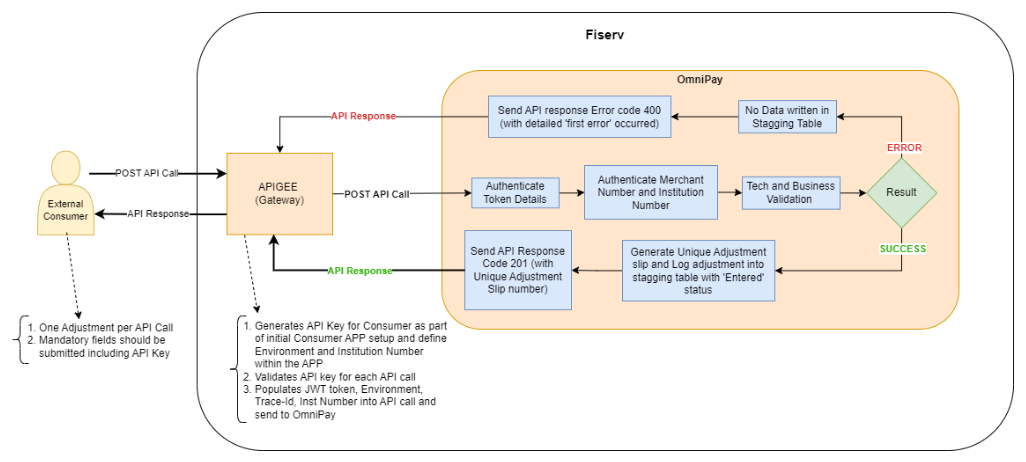
Create an adjustment for an existing merchant by making a POST API call to /post-adjustment endpoint in Financial Adjustment API.
Consumers must pass the following details as mandatory in the POST API call to successfully create an adjustment. The Adjustment Type Index can be extracted by making a GET API call to /retrieve-reference-data endpoint in Financial Adjustment API.
| OBJECT | DESCRIPTION | NOTE |
|---|---|---|
| adjustmentCategory | Indicates the category of the adjustment i.e. specifies that the category is used to identify whether the adjustment is related to charges/fees or if it is a generic adjustment. | Should be one of the valid value defined for an institution. |
| adjustmentTypeIndex | Index of the adjustment transaction type used to post the adjustment to merchant account and can be used to track in reporting. | Should be one of the valid value defined for an institution and mapped to the provided adjustment category. |
| internalMerchantId | Unique OmniPay 8-digit internal merchant number assigned to the merchant where the adjustment should be posted to. | Should be a valid active merchant exists for an institution. |
| amount | Adjustment amount. | Should follow the allowed format. |
| currency | Currency of the adjustment amount. ISO 4217 Alpha Currency code. | Should be one of the valid ISO 4217 format defined on OmniPay platform. |
| date | Indicates the transaction date related to the adjustment made. Format YYYYMMDD. | Should be provided in allowed format. |
Info
- A maximum of 1000 adjustment requests can be submitted in a single API call.
- Fiserv OmniPay processes all submitted adjustments as a batch and returns a structured response containing the success or failure status.
- Upon successful staging of an adjustment, Fiserv OmniPay generates a unique Adjustment Slip Number per adjustment submitted in the batch and returns them in the API response. This reference must be used for all subsequent GET, MODIFY, or CANCEL operations related to the adjustment.
- If any adjustment within the submitted batch encounters an error, the entire batch will be rejected and no adjustments will be processed. The API response will report the first validation error encountered. The submitter must correct the identified issue and resubmit the complete batch for processing.
- Adjustment creation is not permitted while the End-of-Day (EOD) batching process is in progress. Depending on institution configuration, this process may run one or more times per day. If an adjustment request is submitted during this period, the consumer must wait until batching is complete and then resubmit the request.
- If an Account Number is provided, the account must be in Active status and assigned to the specified merchant.
- The adjustment amount must be greater than zero. The number of decimal places must not exceed the precision configured for the specified currency in OmniPay.
API Flow
Updated 2 months ago
Did this page help you?
