
Update an adjustment
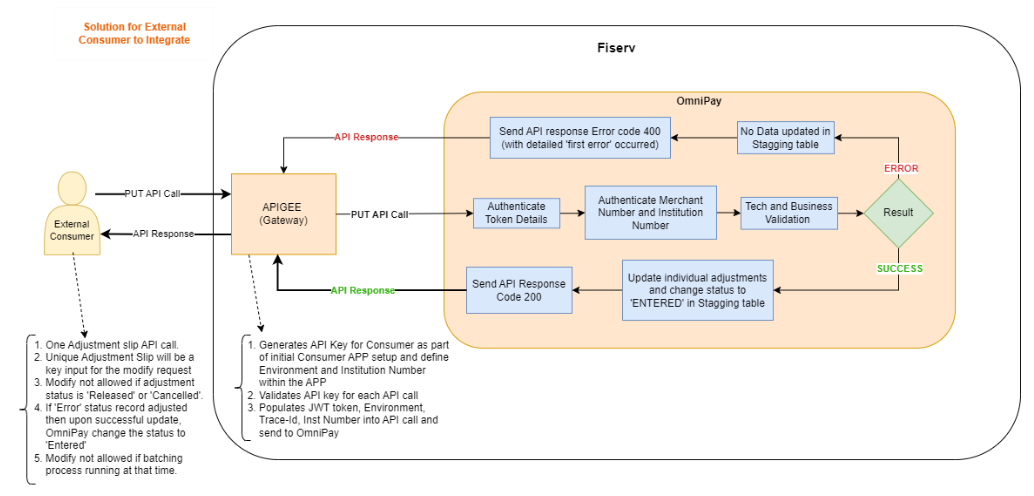
Modify a existing successfully stagged adjustment by making a PUT API call to /modify-adjustment endpoint in Financial Adjustment API.
Consumers must pass the following detail as mandatory in the PUT API call to successfully modify an adjustment.
| OBJECT | DESCRIPTION | NOTE |
|---|---|---|
| adjustmentSlipNumber | Unique slip number generated for the adjustment. This is used to locate the adjustment and modify the data of the respective optional field details provided in the payload | Should be a valid value assigned to an adjustment. |
Info
- A maximum of 1000 adjustment requests can be submitted in a single API call.
- An adjustment cannot be modified if its status is Released or Cancelled.
- If an adjustment in Error status is modified, OmniPay updates its status to Entered.
- Adjustment modifications are not permitted while the End-of-Day (EOD) batching process is in progress. Depending on institution configuration, this process may run one or more times per day.
- If an Account Number is provided, it must be in Active status and assigned to the specified merchant. The adjustment will be posted to the provided merchant account. If no account number is supplied, the adjustment will be posted to the merchant account and account currency determined by the merchant's configured posting instructions.
- The adjustment amount must be greater than zero. The number of decimal places must not exceed the currency precision configured in OmniPay for the specified currency.
- The specified Adjustment Type must be a valid value defined for the institution and mapped to the provided Adjustment Category.
- The specified Adjustment Category must be defined and configured for the institution.
- Adjustments can only be created for merchants that are in Active status.
API Flow
Updated 2 months ago
Did this page help you?
